AR GPS Compass Map 3D1.8.6
Continue to app
Free Version
Publisher Description
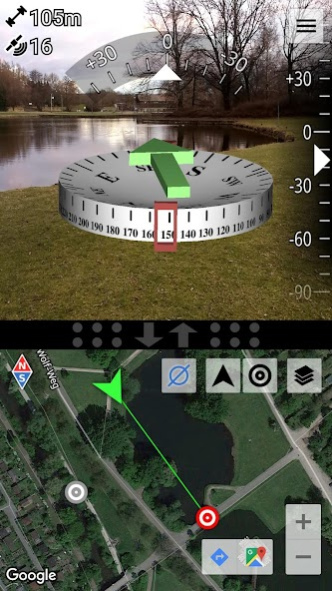
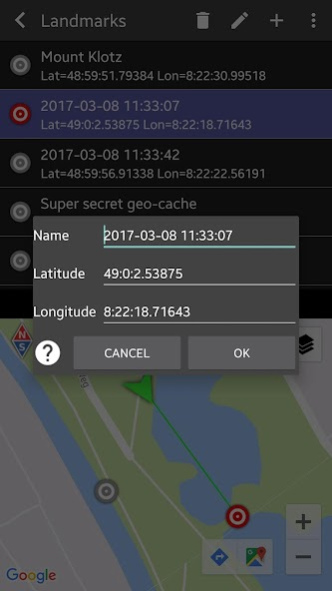
Locating landmarks (e.g. via latitude / longitude) has never been easier thanks to a green arrow on top of the compass that always points towards the currently selected landmark !
Our unique fusion and filtering algorithm that combines the values of the magnetic field sensor, the accelerometer, and the gyroscope gives you a maximum in precision and stability of the compass.
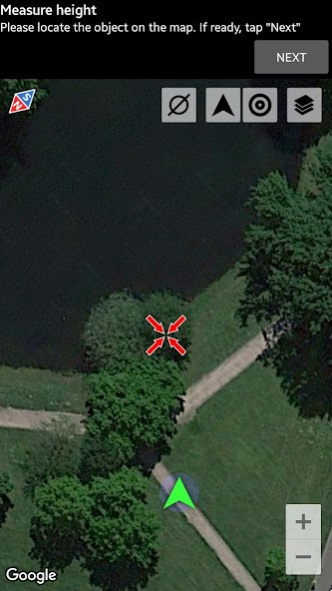
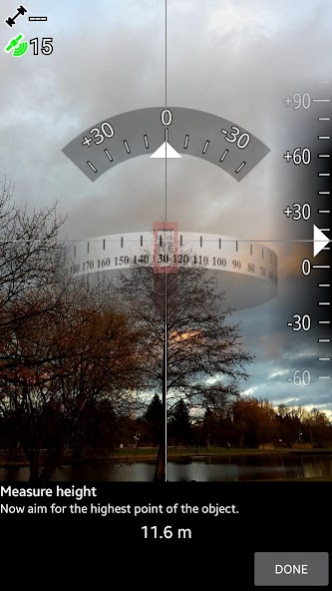
A special feature is the ability to measure the height of large objects, such as houses or trees. Check it out, it's really easy.
Features:
*
3D Augmented Reality display
*
High precision and stability
*
Integrated split-screen map of adjustable size with GPS location
*
Display various GPS information (latitude, longitude, speed, altitude, number of satellites,...)
*
Measure the height of large objects (skyscrapers, trees, ...)
*
Measure magnetic field strength (metal detector)
*
Magnetic field strength warning (indicates magnetic influences)
*
Geocaching: Easily define and find landmarks
*
Share landmarks or your current location with other users
*
Define landmarks by specifying latitude / longitude in various formats
*
Define landmarks by a long-press on the map
*
Define landmarks by specifying distance and bearing
*
Supports LG’s Real3D technology for stereoscopic displays
This is the
Free-Version
. There is also a
Pro-Version
available. Please check our other apps, you can find it there :-)
Have fun :-)
Alex from CodeKonditor
About AR GPS Compass Map 3D
AR GPS Compass Map 3D is a free app for Android published in the Recreation list of apps, part of Home & Hobby.
The company that develops AR GPS Compass Map 3D is CodeKonditor. The latest version released by its developer is 1.8.6. This app was rated by 3 users of our site and has an average rating of 4.8.
To install AR GPS Compass Map 3D on your Android device, just click the green Continue To App button above to start the installation process. The app is listed on our website since 2023-05-06 and was downloaded 75 times. We have already checked if the download link is safe, however for your own protection we recommend that you scan the downloaded app with your antivirus. Your antivirus may detect the AR GPS Compass Map 3D as malware as malware if the download link to com.kettler.argpsc3d is broken.
The company that develops AR GPS Compass Map 3D is CodeKonditor. The latest version released by its developer is 1.8.6. This app was rated by 3 users of our site and has an average rating of 4.8.
To install AR GPS Compass Map 3D on your Android device, just click the green Continue To App button above to start the installation process. The app is listed on our website since 2023-05-06 and was downloaded 75 times. We have already checked if the download link is safe, however for your own protection we recommend that you scan the downloaded app with your antivirus. Your antivirus may detect the AR GPS Compass Map 3D as malware as malware if the download link to com.kettler.argpsc3d is broken.
How to install AR GPS Compass Map 3D on your Android device:
- Click on the Continue To App button on our website. This will redirect you to Google Play.
- Once the AR GPS Compass Map 3D is shown in the Google Play listing of your Android device, you can start its download and installation. Tap on the Install button located below the search bar and to the right of the app icon.
- A pop-up window with the permissions required by AR GPS Compass Map 3D will be shown. Click on Accept to continue the process.
- AR GPS Compass Map 3D will be downloaded onto your device, displaying a progress. Once the download completes, the installation will start and you'll get a notification after the installation is finished.
Program Details
System requirements
Operating systems
Android
Download information
File size
N/A
Total downloads
75
Pricing
License model
Free
Price
Version History
Here you can find the changelog of AR GPS Compass Map 3D since it was posted on our website on 2013-08-22. The latest version is 1.8.6 and it was updated on Soft112 on 12 October, 2026. See below the changes in each version:
version 1.8.1
posted on 2023-05-06
* Improved design
* New calibration method
* Various smaller bugfixes and improvements
version 1.6
posted on 2021-05-01
Small changes to UI. Now without Ads! :-)
version 1.5.5
posted on 2017-08-11
Bugfix in latitude / longitude format
version 1.4
posted on 2013-08-06
--- 1.4.0 --,*Bugfixes and stability improvements,*New location/waypoint sharing procedure,--- 1.3.5 ---,*NEW: Pitch and roll also available as percentage of slope,*Various stability improvements and bugfixes,--- 1.3.3 ---,*NEW: You can now switch between metric (m,kmh), imperial (mi., mph), and nautic (NM, knots) units,*Minor bugfixes and stability improvements,--- 1.3.2 ---,*Minor bugfixes,--- 1.3.1 ---,*Minor bugfixes,--- 1.3.0 ---,*NEW: Magnetic field strength warning,*Minor UI tweaks
version 1.3.5
posted on 2013-06-19
Several fixes and updates
